Properties
UML Diagram Incorrect
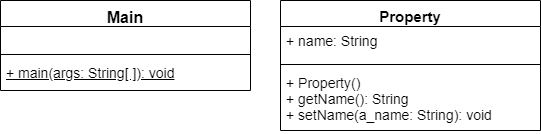
In the video, the UML diagram incorrectly shows the name property as a public property with a + symbol. However, in the code, it is shown as a private property, which is the correct design. The design is also corrected in the example below.
So far in this chapter we’ve learned how to create private and public attributes in our classes. What if we want to create an attribute that is read-only, or one that only accepts a particular set of values? In Java, we can do that using a pattern of getter and setter methods.
Some languages use the term property to refer to an attribute that is typically accessed using getter and setter methods. We will use that term in this context for now.
Getter Methods
In Java, a getter method is a method that can be used to access the value of a private attribute. Conventionally, the method’s name begins with get to make it clear what it does. Let’s look at an example:
public class Property{
  private String name;

  public Property(){
    name = "";
  }

  public String getName(){
    return name;
  }

}
In this class, the name attribute is private, so normally we wouldn’t be able to access its value. However, we’ve created a method getName() that acts as a getter for the name attribute. In this way, the value of that variable can be accessed in a read-only fashion.
From other code, we can call that method just like any other:
Property prop = new Property();
String name = prop.getName();
Setter Methods
Similarly, we can create another method that can be used to update the value of the name attribute:
import java.lang.IllegalArgumentException;

public class Property{
  private String name;

  public Property(){
    name = "";
  }

  public String getName(){
    return name;
  }

  public void setName(String a_name){
    if(a_name.length() == 0){
      throw new IllegalArgumentException("Name cannot be an empty string!");
    }
    this.name = a_name;
  }

}
In this code, we’ve added a setName() method that can be used to update the value stored in the name attribute. We’re also checking to make sure that the argument provided to the a_name parameter is not an empty string. If it is, we can throw an IllegalArgumentException, which would alert the user that this is not allowed. Of course, it would be up to the person writing the code that calls this method to properly catch and handle this exception.
Omitting this Keyword
Notice that the this keyword is omitted in the getter, but is included in the setter? This is often something lazy (or experienced) programmers will do. In a getter, we often don’t have any other variables or parameters, so we can just refer to a class properties by name, such as return name instead of return this.name, and the Java compiler will know that we are referencing the property variable at the class level due to variable overloading.
However, in a setter, we often have additional variables to contend with. So, to avoid the chance of any variable name collisions, we often use the this keyword to access any class properties, such as this.name. This would especially be important if we renamed our parameter from a_name to just name instead. In that case, if we omitted the this keyword, our assignment statement would just be name = name and Java would not understand that we want to set the class property name to the same value as the setter parameter name.
As a general rule, it is always recommended to use the this keyword to access class properties, but if you are comfortable with omitting it in certain situations (provided you know how that will be interpreted), you can get away with it.
UML Class Diagrams
Getter and setter methods are displayed on a UML class diagram just like any other method. We use naming conventions such as getName() and setName() to make it clear that those methods are getters and setters for the attribute name, as in this UML class diagram:
Try It!
So, through the use of getter and setter methods, we can either prevent other code from updating an attribute, or enforce restrictions on that attribute’s values, without actually exposing the attribute. Here’s a sample main class that demonstrates how to use these methods:
public class Main{
  public static void main(String[] args){
    Property prop = new Property();
    String name = prop.getName();
    System.out.println(name);
    prop.setName("test");
    System.out.println(prop.getName());
  }
}